



Opening an Exness account is one of the fastest processes in online forex trading — basic registration takes around 3 minutes, and you can start trading the same day. But knowing exactly which documents to prepare, how to fill in your details, and what happens at each stage will save you time and avoid common mistakes.
This guide walks you through every step of the Exness account opening process, from registration to KYC verification, plus a full comparison of all 5 account types so you can choose the right one from the start.
- Eligibility conditions and required documents
- Step-by-step registration walkthrough
- KYC identity verification process
- All 5 account types compared
- Deposit and withdrawal methods
What Is Exness? Is It Available in Your Country?
Exness is an internationally regulated forex and CFD broker with over 15 years of operating history. It holds licenses from the FCA (UK), CySEC (Cyprus), FSCA (South Africa), and FSA (Seychelles), and its financials are audited by Deloitte — one of the Big Four accounting firms.
Exness is available in most countries worldwide, including across Asia, the Middle East, Africa, and Latin America. The platform supports multiple languages and local payment methods in many regions.
- Exness does not accept clients who are US citizens or residents, regardless of where they currently live
- If you are unsure whether your country is supported, contact Exness 24/7 live chat support before registering
Before You Open an Exness Account
Eligibility Requirements
To open a real trading account with Exness, you must meet two basic conditions:
- Be at least 18 years old
- Not be a US citizen or resident — you will need to confirm this during registration
Required Documents (2 Types)
To complete KYC verification, you will need to submit two types of documents: Proof of Identity (POI) and Proof of Address (POA).
Proof of Identity (POI)
Must be a government-issued document with your photo, name, and date of birth. It must remain valid for at least 3 months from the date of upload.
- Passport
- National ID card
- Driver’s license
Proof of Address (POA)
Must clearly show your full name, residential address, and issue date. The address must match the country you selected during registration.
- Utility bill (electricity, water, gas)
- Bank statement
- Tax notice or government-issued residence document
In some regions, a single document (such as a national ID that includes your address) may satisfy both POI and POA requirements. Follow the prompts in your Personal Area to confirm what applies to your country.
Document Photo Requirements
- All four corners of the document must be visible
- All text must be clearly legible — no blur or glare
- Submit both sides if the document has a back (e.g. national ID)
- Maximum file size: 64MB
- Accepted formats: jpg, jpeg, png, bmp, pdf, mp4, mov
Unverified Accounts Have Restrictions
You can deposit and trade on Exness before completing KYC, but if you do not complete full verification within 30 days of your first deposit, your account’s deposit, withdrawal, and trading functions will be suspended.
Account restriction details before KYC completion
- After email and phone verification: deposit limit of $2,000
- After full KYC verification: deposit limit raised to $50,000
- If 30 days pass after first deposit without KYC, all account functions are suspended
- All restrictions are lifted automatically once KYC is approved
How to Open an Exness Account — Step by Step
The registration process takes around 3 to 5 minutes. Once complete, a Standard account on MT5 is automatically created for you.
- Go to the Exness website and click “Open Account”
- Enter your country, email, and password
- Select “Real Account”
- Verify your email and phone number
- Fill in your personal details and questionnaire
- Registration complete — account is active
Visit the official Exness website (exness.com) and click the “Open Account” button in the top navigation bar.
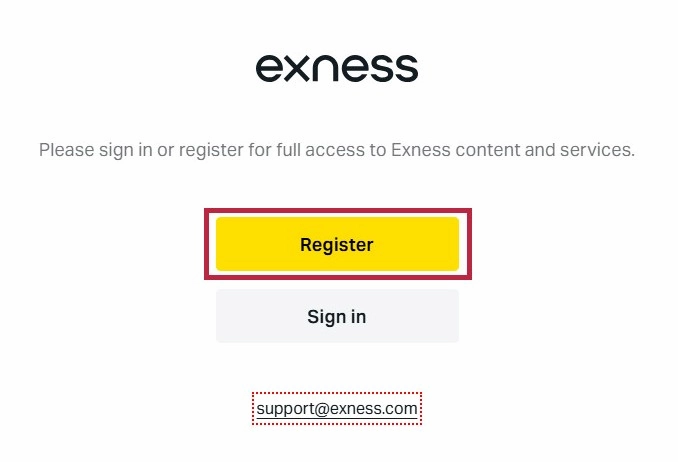
Select your country of residence, enter your email address, and create a password. Check the box confirming you are not a US citizen or resident, then click “Continue.”
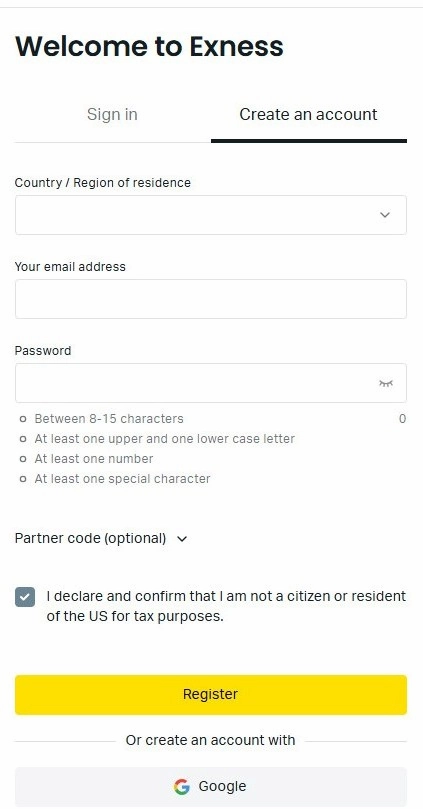
- Your country of residence and email address cannot be changed after registration
- Each email address can only be used once — it cannot be reused for a new account
- Password must be 8–15 characters and include uppercase letters, lowercase letters, and numbers
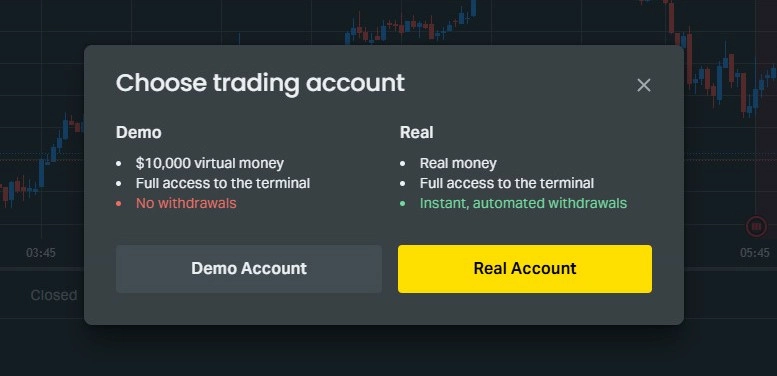
A popup will appear asking you to choose between a real account and a demo account. Select “Real Account” to proceed.
After this step, Exness automatically opens your first MT5 Standard account (USD base currency). To use other account types, you can add them later from your Personal Area.
Exness will send a 6-digit verification code to your email. Enter the code and click “Continue.” Then enter your phone number and verify it with the SMS code you receive.
When entering your phone number, select your country code (e.g. +44 for the UK, +61 for Australia) and enter the number without the leading zero.
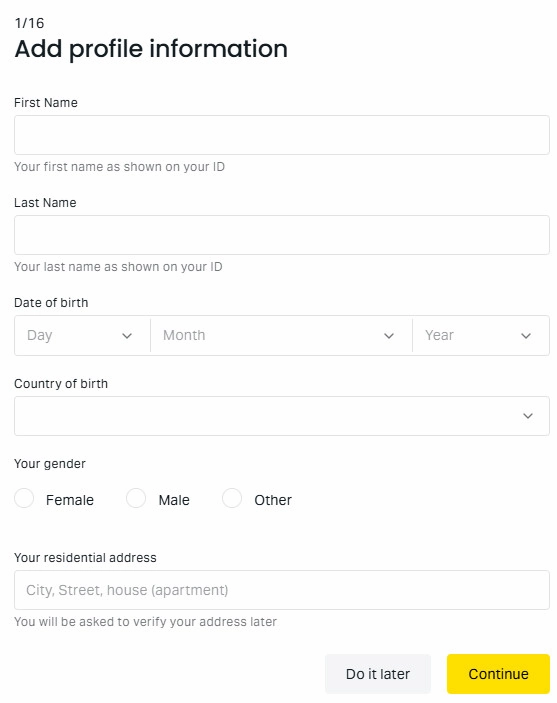
Fill in your full name, date of birth, residential address, and gender. Use English for all fields, and make sure the information exactly matches the documents you will submit for KYC.
Answer questions about your occupation, financial situation, and trading experience. Your answers do not affect account approval — answer honestly.
Your account is now active. You can deposit up to $2,000 and begin trading immediately. Complete KYC verification to unlock full account features.
- Withdrawals are restricted until KYC is complete
- Complete KYC within 30 days of your first deposit to avoid account suspension
| Item | Details |
|---|---|
| Platform | MT5 |
| Account Type | Standard |
| Base Currency | USD |
| Max Leverage | Varies based on account equity, up to unlimited leverage |
The first account is always a Standard account. You can add other account types (Raw Spread, Zero, Pro) at any time from your Personal Area — see our Exness account types guide if you are unsure which fits MT5. To download MetaTrader 5, find your server and login ID, and troubleshoot common errors, follow the Exness MT5 login guide.
Exness KYC Verification — Identity and Address Documents
After registration, submit your KYC documents to unlock full account access including withdrawals. Verification usually completes within 24 hours, and many users are approved within minutes.
- Prepare your documents in advance
- Log in to Personal Area and click “Complete Profile”
- Upload Proof of Identity (POI)
- Upload Proof of Address (POA)
- Wait for approval (usually within 24 hours)
Log in to the Exness Personal Area and click “Complete Profile” or “Verify Now” from the dashboard prompt.
Select your country and document type (e.g. passport or national ID), then upload a clear photo. Click “Submit Documents.”
If your ID has a back side (e.g. national ID card), submit both sides as separate images.
Upload a recent address document and submit. The document must match the country and address you registered with.
You will receive an email notification when verification is complete. If no update after 24 hours, check your spam folder or contact support from your Personal Area.
You can also check the current verification status directly in your Personal Area at any time.
Exness Account Types — All 5 Compared
Exness offers 5 real account types split into Standard and Professional categories. Here is how they compare.
Standard Accounts (Recommended for Beginners)
| Account | Min. First Deposit | Min. Spread | Commission | Instruments |
|---|---|---|---|---|
| Standard | From $10 | 0.2 pip | None | Forex, crypto, metals, energy, stocks, indices |
| Standard Cent | From $10 | 0.3 pip | None | Forex and metals only |
Standard is the most popular account type, commission-free with a minimum deposit from $10. It covers around 200 instruments and is ideal for all experience levels.
Standard Cent trades in micro-lots 100x smaller than Standard, making it ideal for absolute beginners who want real-market exposure at minimal financial risk. Instrument selection is limited to forex and metals.
Professional Accounts (For Experienced Traders)
| Account | Min. First Deposit | Min. Spread | Commission | Key Feature |
|---|---|---|---|---|
| Raw Spread | $3,000 | 0.0 pip | Up to $7/lot (round trip) | Ultra-low spreads, wide instrument coverage |
| Zero | $3,000 | 0.0 pip | From $0.2/lot | Zero spread on majors for most of the trading day |
| Pro | $3,000 | 0.1 pip | None | Zero commission, instant execution, no slippage |
Raw Spread: Minimum spread of 0.0 pip with commission up to $7 per lot (round trip). Best for traders who need tight spreads across a wide range of instruments.
Zero: Zero spread on major currency pairs for most of the trading session, with commission from $0.2 per lot. Ideal for scalpers and high-frequency traders focused on majors.
Pro: Spreads from 0.1 pip with zero commission. The only professional account using instant execution — no slippage. Well-suited for day traders who need price certainty.
Account types cannot be changed after opening, but you can add as many additional accounts as you need. Exness allows up to 100 MT4 and 100 MT5 accounts under the same login — 200 in total.
Which Account Type Should You Choose?
- New to trading: Start with the Standard account and upgrade once comfortable
- Want to practice with minimal risk: Standard Cent reduces position size by 100x
- Scalping major pairs: Zero account offers 0 spread on majors for most sessions
- High-frequency or EA trading: Raw Spread is the common choice
- No-commission, no-slippage priority: Pro account with instant execution
- EA users or MT4 beginners: Use MT4; manual traders: MT5 is generally recommended
Deposit and Withdrawal Methods
Exness supports a wide range of funding methods with zero deposit fees. Available options vary by country, but commonly include:
- Credit / Debit Cards: Visa, Mastercard (instant)
- E-wallets: Skrill, Neteller, STICPAY
- Cryptocurrency: USDT (TRC20/ERC20), Bitcoin, Binance Pay
- Bank transfer: Available in select regions
Exness is widely recognized for near-instant withdrawals — most users report funds arriving within 1 to 3 minutes.
Same-in-same-out rule: Withdrawals must use the same payment method, account, and currency used for the deposit. Withdrawing via a different method or wallet address than the one used to deposit will be automatically rejected.
Exness Account Opening FAQ
Answers to the most common questions from new Exness users.