


Opening a Bitget account takes less than a minute for basic registration, and KYC identity verification is typically approved within 1 hour. Bitget’s standout feature is its copy trading system, which allows anyone — including complete beginners — to automatically replicate the trades of professional traders without needing technical analysis skills.
This guide walks you through every step of the Bitget account opening process, explains the two-level KYC verification system, and covers the key features and deposit methods you need to know before getting started.
- Eligibility conditions and required documents
- Step-by-step account registration
- KYC Level 1 and Level 2 verification (including facial recognition)
- 2FA security setup
- Deposit methods and copy trading overview
What Is Bitget? Is It Available in Your Country?
Bitget is a global cryptocurrency exchange founded in 2018, with over 120 million registered users across 150+ countries. It ranks 6th on CoinGecko’s trust score and consistently places in the top 5 for derivatives trading volume globally. The platform offers spot trading, futures, copy trading, trading bots, and earn products — with copy trading being its most recognized and widely used feature.
Bitget is available in most countries worldwide. The platform supports multiple languages and a wide range of local payment methods across different regions.
- Bitget does not accept users from 25 restricted jurisdictions, including the United States, Canada, and Singapore
- Bitget is a centralized cryptocurrency exchange (CEX), not a traditional forex broker — the regulatory environment and risk profile are different from platforms like Exness or XM
Before You Open a Bitget Account
Eligibility Requirements
- Be at least 18 years old
- Not be a resident of a restricted country (US, Canada, Singapore, and 22 others)
KYC Verification Levels Explained
Bitget uses a two-level KYC system. Higher verification unlocks more features and higher withdrawal limits:
| KYC Level | Required Documents | Features Unlocked | Daily Withdrawal Limit |
|---|---|---|---|
| Unverified | — | ❌ Cannot deposit, trade, or withdraw | — |
| Level 1 (Basic) | Government ID + facial recognition | ✅ Deposits, spot, futures, copy trading, P2P | Up to $3M USDT/day |
| Level 2 (Advanced) | Level 1 + proof of address | ✅ All features + Bitget Card eligibility | Higher limits |
Required Documents
Level 1 — Proof of Identity
- National ID card (both sides)
- Passport
- Driver’s license
Level 2 — Proof of Address (issued within 3 months)
- Utility bill (electricity, water, gas)
- Bank statement
- Official government correspondence showing your address
- Screenshots of digital bank statements are not accepted — submit the original PDF file or a photo of a printed statement
- The name on your proof of address must exactly match the name on your Level 1 identity document
- Each identity document can only be linked to one Bitget account
Document Photo Requirements
- All four corners of the document must be clearly visible — no cropping
- All text must be legible — avoid glare, shadows, or blur
- Submit both sides of your ID if it has a back (e.g. national ID card)
- You have a maximum of 5 KYC attempts per 24 hours — if all fail, wait 24 hours before retrying
How to Open a Bitget Account — Step by Step
The full onboarding process covers three stages: account registration, KYC verification, and 2FA security setup.
- Visit Bitget and register with email or phone
- Complete email / SMS verification
- Complete KYC Level 1 (ID + facial recognition)
- Complete KYC Level 2 (proof of address — recommended)
- Set up 2FA security
- Account ready — deposit and start trading
Stage 1: Account Registration
Go to the official Bitget website (bitget.com) and click “Sign Up” in the top right corner.
Enter your email address (recommended) or phone number, create a password, and click “Create Account.” If you have a referral code, enter it at this stage — it cannot be added later.
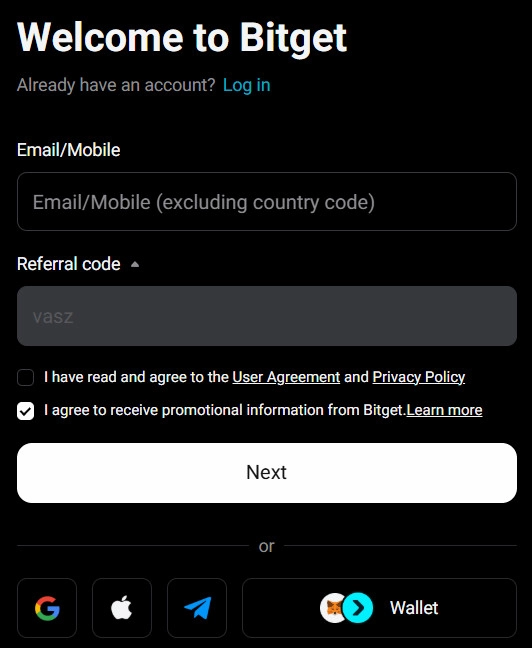
- Password must be 8–32 characters using at least two of: letters, numbers, or symbols
- Referral codes cannot be added after registration — enter it now if you have one
Complete the slide CAPTCHA, then enter the 6-digit verification code sent to your email or phone. Your account is now created.
After registration, Bitget will automatically guide you to the KYC verification flow. Complete it immediately to unlock all trading features.
Stage 2: KYC Identity Verification
Click the profile icon in the top right corner, select “Identity Verification,” or click “Verify Now” from the prompt on your dashboard.
Select your country of residence and the type of identity document you will use (national ID, passport, or driver’s license).
Upload clear photos of the front and back of your ID. Ensure all four corners are visible, text is fully legible, and there is no glare or blur.
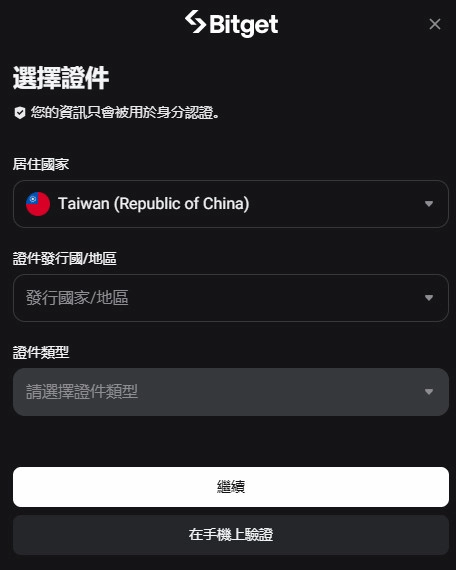
Taking photos with a smartphone camera rather than a scanner generally produces better results and a higher approval rate.
After uploading your ID, Bitget will prompt you to complete a facial recognition (selfie liveness check) to confirm that you match the submitted ID. Follow the on-screen prompts, which may include blinking or turning your head.
- Perform the check in a well-lit environment — avoid backlighting or dim lighting
- Do not wear hats, glasses, or face masks during the check
- Use a plain, uncluttered background for best results
Bitget typically reviews Level 1 submissions within a few minutes to 1 hour. You will receive an email and in-app notification when approved. If no update after 1 hour, contact support with your UID.
Once Level 1 is approved, you can deposit and trade immediately. It is recommended to also complete Level 2 (proof of address) to unlock higher withdrawal limits and Bitget Card eligibility.
Select Level 2 verification, enter your residential address, and upload a proof of address document issued within the last 3 months. Review typically takes 30 minutes to 1 business day.
- Screenshots of digital statements are not accepted — upload the original PDF or a photo of a physical document
- The address on the document must exactly match the address you enter during the Level 2 form
Stage 3: Set Up 2FA Security (Strongly Recommended)
After completing KYC, set up two-factor authentication (2FA) to protect your account. Every login and withdrawal will require an additional 6-digit code, significantly reducing the risk of unauthorized access.
In Account Settings, go to “Security” → “Google Authenticator.” Download the Google Authenticator app on your phone, then scan the QR code shown in Bitget to link the accounts.
Enter the 6-digit code from Google Authenticator into Bitget’s verification field, then enter the code from your email or SMS, and click “Confirm” to complete 2FA setup.
Always back up your Google Authenticator secret key. If you lose access to your phone without a backup, account recovery is a lengthy process.
Key Bitget Features
Copy Trading
Bitget’s signature feature. Browse and filter traders by historical performance, follower count, win rate, and maximum drawdown in the copy trading marketplace. Set your copy amount and the system will automatically replicate every trade the selected trader opens and closes — no manual input required.
Copy trading carries real financial risk. Past performance does not guarantee future results. Research traders carefully over at least 3 months of data, set position size limits, and use stop-loss settings before activating any copy trade.
Other Key Features
- Spot Trading: 600+ cryptocurrencies including BTC, ETH, SOL, and trending meme coins
- Futures Trading: USDT-margined, coin-margined, and USDC-margined contracts with up to 125x leverage
- Trading Bots: Grid bots, DCA bots, and other automated strategy tools
- Stock Tokens: As of February 2026, Bitget offers 24/7 trading of tokenized US stocks (e.g. Nvidia, Tesla) and TradFi products including forex and gold
- Earn: Flexible and fixed-term savings products to earn yield on idle crypto
Deposit and Withdrawal Methods
Bitget supports several deposit methods. Availability varies by region:
- Crypto deposit (on-chain transfer): Transfer crypto from another wallet or exchange — no Bitget deposit fee, but network gas fees may apply
- Credit / Debit Card: Visa and Mastercard via third-party providers — convenient but fees of approximately 3–5% apply
- P2P Trading: Buy crypto directly from other users in your local currency — lower fees but requires caution to avoid scams
- Third-party payment: Varies by region
- Always select the correct blockchain network when depositing crypto — sending to the wrong network may result in permanent loss of funds
- Bitget does not charge internal deposit fees, but network transaction fees (gas) apply for on-chain transfers