




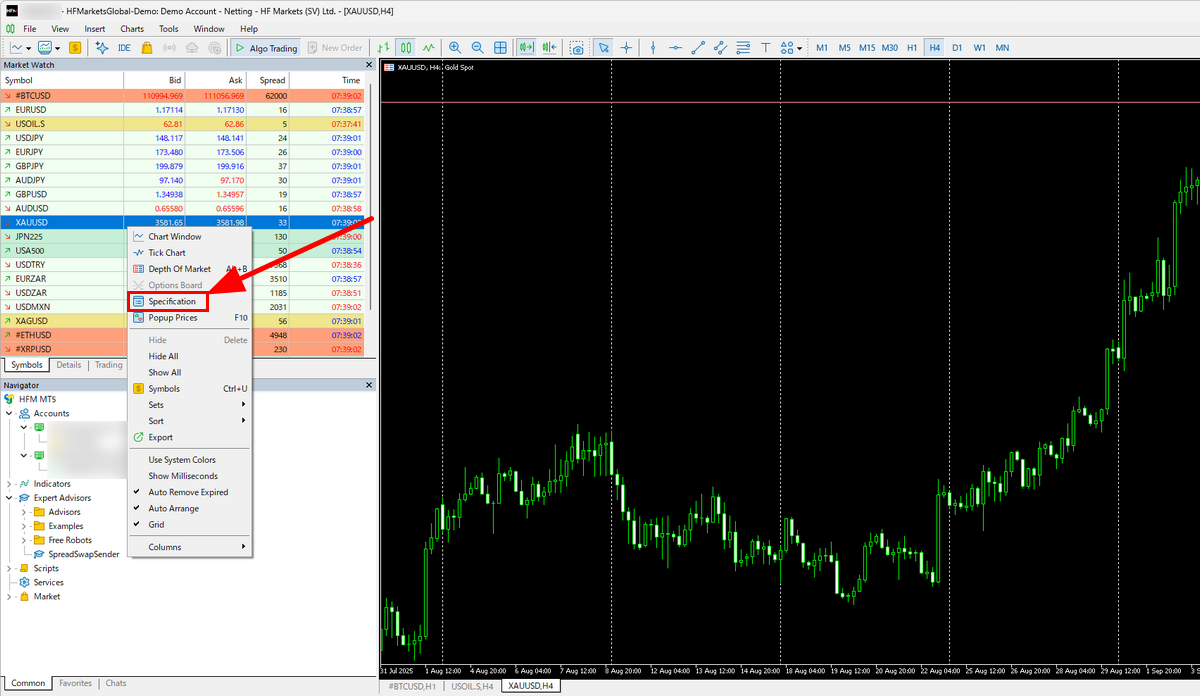
To check XAUUSD specifications in MT5 on Windows, open Market Watch, right-click the exact gold symbol used by your account, and select Specification. Read the contract size, tick size/value, volume limits, swap settings and trading sessions for that symbol. The figures can differ between account servers and symbols, even when both charts show gold.
For the amount of gold represented by a position, see the XAUUSD lot-size explanation. Reading a specification does not require placing an order.
Open the specification for the correct gold symbol
In MT5, open View → Market Watch.
Find the symbol used on your gold chart. Its name may include a suffix; copy the full name rather than choosing another instrument because its price looks similar.
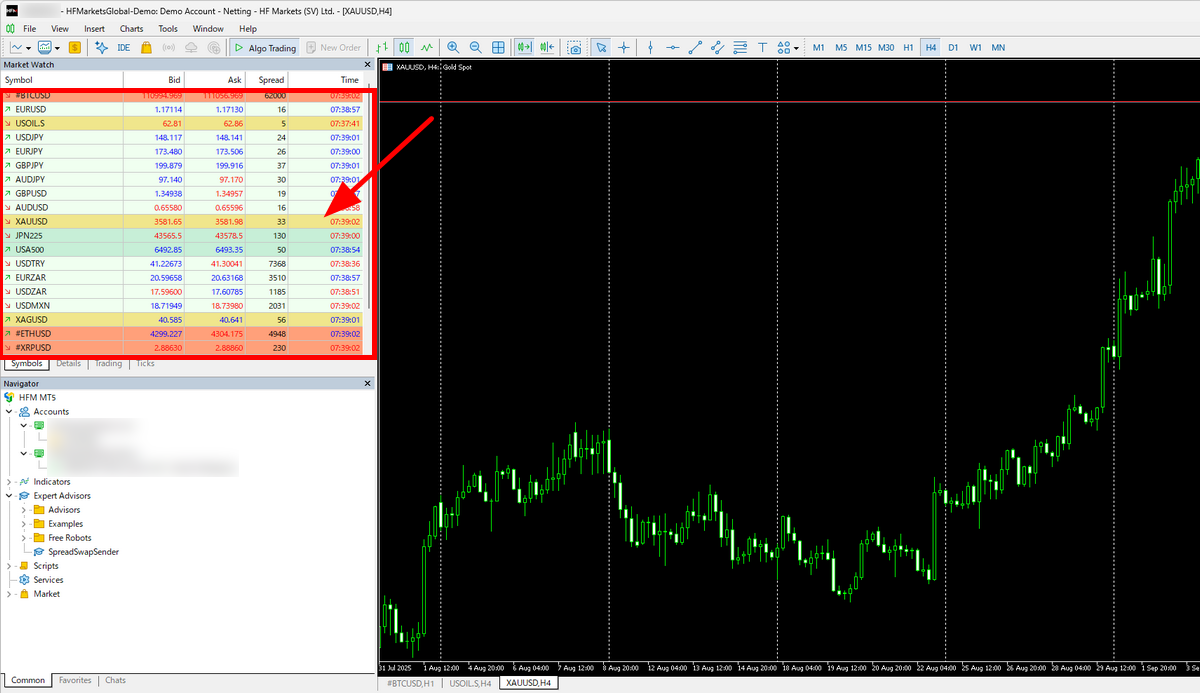
If the symbol is missing: open Symbols from the Market Watch context menu, search for the symbol or its description, and inspect the matching instrument’s properties. Check that it belongs to the connected account server.
Right-click the symbol and choose Specification. Avoid New Order or the Buy/Sell panel when you only want to inspect settings.
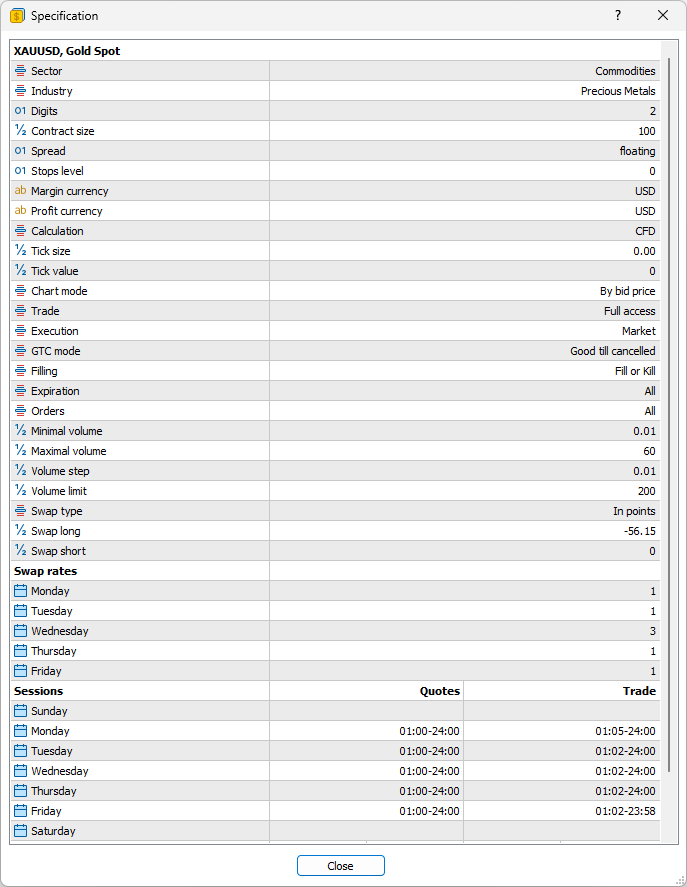
Scroll through the Specification window to find the contract size, tick size and tick value, volume limits, swap settings and trading sessions. The field guide below explains what to check in each section.
The steps here are for the Windows desktop terminal. Translated menu labels and mobile layouts can differ. A screenshot from another account is a reference for locating fields, not proof of the conditions on your own account.
XAUUSD Specification Fields Explained
| MT5 field | What to check | Why it matters |
|---|---|---|
| Contract size | Quantity represented by 1.00 lot | Do not assume every gold instrument uses the same quantity. |
| Digits / Tick size | Displayed decimals / minimum price increment | A displayed point and a tradable tick are not automatically identical. |
| Tick value | Money value associated with a tick; check currency and calculation context | A price increment is not itself a cash profit or loss. |
| Minimal volume / Volume step | Smallest volume and permitted increments | A volume above the minimum can still be invalid if it does not match the step. |
| Maximal volume / Volume limit | Per-deal limit / aggregate directional limit where provided | These are different constraints. |
| Stops level / Freeze level | Minimum stop distance and restrictions near the market | Price precision alone does not tell you whether an order modification is allowed. |
| Swap type / Long / Short / weekday rates | Units, direction and applicable daily multipliers | The same displayed number can mean different holding costs. |
| Calculation / Margin / Sessions | Margin method and available trading times | Account leverage and your local clock are not enough to infer these settings. |
Check lot size, volume steps, and tick value
For example, if your symbol’s contract size is 100 troy ounces per lot, a 0.10-lot position represents 10 ounces. If its tick size is USD 0.01 per ounce, one tick corresponds to USD 0.10 for that position, before spread, commission, swap and currency conversion. If the minimum volume and volume step are both 0.01 lot, the permitted volumes start at 0.01 lot and increase in 0.01-lot increments.
With a 0.01-lot step, 0.015 lot does not match the increment even though it exceeds the minimum. If an order is rejected for volume, compare the entered amount with the minimum, step, maximum and any aggregate limit. Do not change the volume blindly just to make the order pass.
For a simple linear USD-quoted gold contract, quantity × price change provides a useful cross-check. Other calculation modes or account currencies can require different handling. Recheck the terminal’s values and margin and pip-value calculator inputs rather than treating an example as a universal rule.
Read swap units and weekday multipliers together
Read Swap type before interpreting Swap long or Swap short. A value expressed in points is not the same as a cash amount. Then check the multiplier for each weekday, or the triple-swap-day field if that is how your terminal displays it.
For example, a hypothetical −2 USD per lot base swap with a multiplier of 3 gives −6 USD per lot for that rollover. That calculation only applies when the base value is actually in USD and the multiplier applies to that position. A zero shown in a field does not establish permanent swap-free eligibility; account conditions and other holding charges may differ.
In the screenshot above, Swap type is In points, Swap long is −56.15 and Wednesday’s multiplier is 3. The −56.15 is not a USD cash charge. These are the displayed settings of one account, not universal or current terms for every XAUUSD symbol.
When the displayed settings do not explain the result
| Problem | Next check |
|---|---|
| Gold is missing | Confirm the account server, full symbol name and available instruments in Symbols. |
| Tick value appears zero or unexpected | Check connection and quotes, account currency and the symbol calculation method. Reopen the properties and ask the provider if the inconsistency remains. |
| Invalid stops | Check Stops level, price alignment to Tick size, and the relevant Bid/Ask side. A zero Stops level does not guarantee every requested modification will be accepted. |
| Not enough money | Check free margin and the applicable margin calculation, including existing exposure and any tiered rates. |
| Market closed | Check the symbol’s trading sessions and server time, including holidays and daily breaks. |
For sessions, distinguish the broker’s server time from your own clock and check daylight-saving changes. For margin figures shown inside Specification, reopen the window before relying on a refreshed estimate. Specifications describe rules; they do not guarantee that an order will execute at a quoted price.
Saving or sharing a screenshot? Note the capture date and hide account numbers, balances, order tickets and personal details before sharing it.
Reference: MetaQuotes MT5 Help: Market Watch and contract specifications, checked 8 September 2026. This is a platform-use guide, not a broker recommendation or an invitation to trade. Product availability depends on your jurisdiction.
- How to calculate XAUUSD pips — pip size and pip value per lot
- XAUUSD profit calculator — profit or loss from entry and exit prices
- XAUUSD lot size calculator — lot size from your risk % and stop-loss distance
- XAUUSD swap calculator — overnight holding cost for buy or sell positions
- XAUUSD spread comparison — measured gold spreads across broker accounts