




ThinkMarkets handles account registration entirely through ThinkPortal — its centralised client management platform. The process covers personal details, trading preferences, KYC document upload and your first deposit, all in one place. Most applications can be completed in a single session, though verification speed depends on your documents and region.
This guide follows the official registration flow as published on ThinkMarkets’ website. Specific conditions — minimum deposits, leverage limits, available payment methods and the regulatory entity assigned to your account — vary by country, account type and platform. Confirm the current requirements shown during registration or in your ThinkPortal account.
- What to prepare before you start
- Account types and platform lock-in explained
- Step-by-step registration through ThinkPortal
- KYC verification: documents required
- Making your first deposit
- Opening a demo account
- What to do after your account is approved
- FAQ
What to Prepare Before Opening a ThinkMarkets Account
| Item | Details |
|---|---|
| Email address | Used for account verification and ongoing notifications. Use an address you check regularly |
| Personal details in English | Full name and residential address as they appear on your identity documents. Non-English names should be entered in Roman transliteration consistent with your passport |
| Phone number | Required for SMS verification during registration. Select your country code |
| Government-issued photo ID | Passport (photo page) or national ID card (front and back). Must be in colour, clearly legible and unexpired |
| Proof of address | A document showing your full name and current residential address — commonly a bank statement, credit card statement, utility bill or official government letter. Check the specific requirements shown in ThinkPortal during KYC, as accepted document types and date requirements vary |
| Intended deposit method | Available payment methods vary by region and account type. Confirm which options are available to you in ThinkPortal after registration |
ThinkMarkets Account Types: Choose Your Platform First
The most important thing to understand before registering: your account type determines which trading platforms you can use. This is the single biggest structural difference between ThinkMarkets and most other brokers.
What Is ThinkPortal?
ThinkPortal is ThinkMarkets’ centralised client management hub — used for registration, KYC, deposits, withdrawals, account management and trading tools. All account types are opened and managed through ThinkPortal. You do not need to use separate portals for different account types.
| Account | Spread (EUR/USD) | Commission | Platforms | Best for |
|---|---|---|---|---|
| Standard | From ~0.4 pip (variable) | None | MT4, MT5, ThinkTrader | Beginners and moderate-frequency traders who want platform flexibility |
| ThinkTrader | From ~0.4 pip (variable) | See ThinkPortal | ThinkTrader, TradingView only | ThinkTrader App and TradingView users; no MT4/MT5 or EA support |
| ThinkZero | From 0.0 pip (variable) | See ThinkPortal | MT4, MT5 only | EA traders and scalpers needing the tightest raw spreads; no ThinkTrader App |
The platform lock-in matters: ThinkZero (lowest raw spreads) only works on MT4/MT5 — no ThinkTrader App. The ThinkTrader account only works on ThinkTrader and TradingView — no MT4/MT5 EA support. Standard is the only account that supports both MT4/MT5 and ThinkTrader. Decide which platform you need before choosing an account type.
How to Open a ThinkMarkets Account (ThinkPortal)
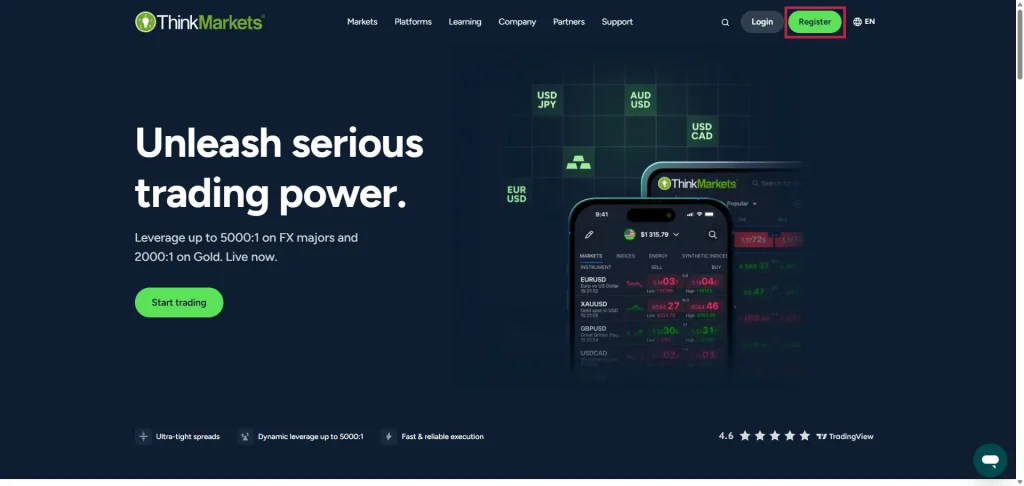
Step 1: Go to your local ThinkMarkets website and click “Register”
Go to your local ThinkMarkets website and click the “Register” button to begin the ThinkPortal registration process. The button label may appear as “Open Account” or “Get Started” depending on your region.
Step 2: Enter your personal details
The first registration screen asks for your basic personal information. Enter your name in English, exactly as it appears on your passport or government-issued ID — including the spelling and order of given name and family name. If your name is entered differently from your KYC documents, your verification will be returned.
| Field | Notes |
|---|---|
| Country of residence | Select your current country of residence. This determines which regulatory entity and local ThinkMarkets website applies to your account |
| First name | As shown on your passport or government ID, in Roman characters |
| Last name | As shown on your passport or government ID, in Roman characters |
| Date of birth | Must match your identity document |
| Phone number | Select your country code and enter your mobile number. Used for SMS verification |
| Email address | Use an address you check regularly. Verification and account notifications will be sent here |
| Password | At least 8 characters including uppercase, lowercase and numbers |
Step 3: Select your account type and platform
After your personal details, you will be asked to choose your account type and trading platform. Refer to the comparison table above before making your selection.
- Need EA or MT4/MT5 with the tightest possible spreads → ThinkZero
- Want to use ThinkTrader App or TradingView → ThinkTrader account
- Want flexibility across multiple platforms → Standard
- Not sure yet → Standard. Additional account types can be opened later inside ThinkPortal without repeating KYC
Step 4: Complete the personal background questionnaire
ThinkMarkets requires a short questionnaire covering your employment status, annual income, available trading capital and source of funds. This is a regulatory requirement — answer according to your actual situation. Your responses do not affect whether your application is approved.
Step 5: Upload your KYC documents
ThinkMarkets KYC Verification Process
To activate a live account, ThinkMarkets requires identity and address verification. Documents are uploaded directly in ThinkPortal.
| Document type | Accepted documents | Requirements |
|---|---|---|
| Proof of identity (one required) | Passport (photo page) or government-issued national ID card (front and back) | Colour scan or clear photo; unexpired; all details legible |
| Proof of address (one required) | Bank statement, credit card statement, utility bill (electricity, water, internet) or official government document showing your name and address | Must display your full name, current address and date. Screenshots of online statements are generally not accepted — use original scans or clear photos. Accepted document types and date requirements are shown in ThinkPortal during KYC |
Step 6: Wait for verification
How Long Does ThinkMarkets Account Verification Take?
Most applications are reviewed on the same day, though actual verification speed depends on document completeness, verification method and your region. If your documents do not meet the requirements, ThinkMarkets will notify you by email with details of what needs to be resubmitted.
Making Your First Deposit
Once KYC is approved, you can fund your account through ThinkPortal. Available payment methods, minimum deposit amounts and processing times vary by region and account type — check the options shown in your ThinkPortal account.
| Method | Typical speed | ThinkMarkets fee | Notes |
|---|---|---|---|
| Bank transfer | 1–3 business days | None (intermediary bank fees may apply) | Suitable for larger amounts; slowest method |
| Credit/debit card (Visa, Mastercard) | Instant or same day | None | Card issuer foreign transaction fees may apply |
| E-wallets (Skrill, Neteller) | Instant or same day | None | Wallet provider fees may apply |
| Cryptocurrency (USDT) | Variable | None | Availability varies by region; network fees apply |
Test the withdrawal process before depositing large amounts. Make a small initial deposit, place a test trade, and complete a small withdrawal to confirm the full process works as expected before committing significant capital.
ThinkMarkets Demo Account
ThinkMarkets offers free demo accounts that do not require KYC to access. Demo accounts can be opened before or alongside a live account and are available for all three account types.
- Existing ThinkPortal users: log in → navigate to the account dashboard → select “Add Demo Account”
- New users: go to the ThinkMarkets website → select the demo account option → enter your email and phone number
- Choose a platform (ThinkTrader / MT4 / MT5 / TradingView) and virtual balance amount
- Download the platform and log in with your demo credentials
Demo account validity periods may vary by platform, account type or ThinkMarkets policy — check the current terms on the official ThinkMarkets website or with support.
Test your EA or custom indicator on a demo account before going live. Confirm that your strategy executes as expected in ThinkMarkets’ MT4/MT5 environment before funding a live account.
What to Do After Your Account Is Approved
- Once KYC is approved, make a small initial deposit to test that the process works correctly
- Complete a small withdrawal — confirm that your chosen withdrawal method processes correctly before depositing larger amounts
- Check whether Trading Central is available in your ThinkPortal account — availability may vary by account type and region
- Review the inactivity fee policy — ThinkMarkets charges a fee after a period of no trading activity. The specific amount and timeframe depend on your regulatory entity and region. Set a reminder to place at least one trade within the applicable period if you plan to trade infrequently
- Once deposits, trading and withdrawals are confirmed working, open additional account types (ThinkZero or ThinkTrader) inside ThinkPortal as needed — no additional KYC required
ThinkMarkets allows multiple account types to be held simultaneously within a single ThinkPortal login. Funds can be transferred between accounts instantly. If you are unsure which account type to start with, open a Standard account first — it is the only type that supports both MT4/MT5 and ThinkTrader. You can add ThinkZero or ThinkTrader accounts at any time without repeating KYC.